
Slumber Islands are a new feature added to Animal Crossing: New Horizons as part of the January 2026 Update. These islands are the game’s answer to two longstanding fan requests: the ability to create more than one island per console, and the ability to do it with some friends.
Through this new feature, players can work with friends to create up to three different island designs that are completely separate from your main island. It’s a great way to try out new designs, work collaboratively, and quickly bring your vision to life without having to redo any part of your own space. To start a Slumber Island, just lie down in any bed and you’ll be visited by Luna and prompted to start a new session.
There are plenty of reasons to be excited about Slumber Islands, but there are also several limitations. Carrie Lambertsen and I checked out the new update to see what players should be aware of before they dive into the new feature.
You Can Catch Critters But You Can’t Keep Them
Pockets Are Mostly For Show

You can do a lot of the same things on the Slumber Islands as on your home island, including fishing, bug catching, and harvesting. You even get a timer by default, making it possible to host events and races with your friends for the most bugs or fish caught.
But a dream is just a dream, and everything on Slumber Island is ephemeral. In other words, anything you catch, fish, collect, or pick up does not go in your pockets. It also doesn’t go into your collection of items back home.
As the host, you can only dream of things you’ve personally encountered, so you’ll only find critters and items that you’ve already cataloged. The same isn’t true for visiting someone else’s island, though. We weren’t able to test this, but in theory, you could come across creatures you’ve never seen before and not be able to register them to your Critterpedia or add them to your pockets for Blathers.
Visitors Have Nearly No Limitations
Anyone Can Move Anything Around

As soon as Carrie got to my island, she immediately started moving things around, digging holes, and other such shenanigans. We were testing all the features, so this kind of chaos was welcome—but if you’re just playing with friends or online strangers, it’s something to keep in mind.
Although only the host can change the time of day and move the house around, visitors can make practically any change they want to the Slumber Island without restrictions. Collaborators can add, move, redesign, and remove items (though they bypass their pockets), dig holes, make and break cliffs, create waterways, place custom designs, and more.
There also doesn’t seem to be a way to kick out a single individual visitor. So if you find that someone isn’t being very cooperative, the only way to remove them seems to be to leave the dream and start a new one.
You Can Freely Change Weather And Time Of Day
Dreams Don’t Follow Real-World Logic

If you’re the host of the island, you have the power to change the time of day and the weather. Pressing left on the D-Pad brings up a small menu where you can slide along a scale to change the time of day and activate any weather effects like snow in the winter.
Disappointingly, it seems that you can’t change the time of year or the season. This would have been a useful feature, to be able to see what your design looks like year-round, or to be able to escape from the gloom of winter. In addition, only the host has the power to change the time of day.
Hosts And Visitors Can Change Their Appearances
It’s Only Temporary, And There’s A Catch

What you wear while walking around at home might not be what you want to wear when hanging out with friends in a dream. Luckily, you’re not stuck wearing what you go to sleep in while you’re on Slumber Island. Interacting with the wardrobe to the top left from Luna allows you to change your outfit at a whim.
You’ll have access to all the clothing items that you have back at your real home, as well as all your custom designs. Just remember: since this is only a dream, your appearance will change back as soon as you wake up back on your island.
If you’re visiting a friend’s Slumber Island, you will only be able to access the host’s clothing instead of your own. On the bright side, since there’s no item limits, everyone will have something to wear. You could even be twinning with up to 12 different people at once!
You Need A Nintendo Membership To Create Slumber Islands
It’s An Online, Multiplayer Feature

Slumber Islands are an always-online, multiplayer feature of Animal Crossing: New Horizons. This means that, like all other multiplayer Switch features, you’ll require a Nintendo Membership to access them.
This isn’t new, as Dream Islands previously also needed a Nintendo membership. It’s important to remember, though, because you won’t even be allowed to make any new islands without a subscription, even if you don’t plan to invite any friends over to help you.
Also worth noting: Anyone you invite to work on your Slumber Island will also need to be Nintendo members.
Slumber Islands Give You A Second House To Decorate
But No Other Buildings

When you’re choosing an island size, you might notice a little pink square at various locations on each layout option. This is where your dream house will appear when you load the island. Your Slumber Island house is the same size as your actual house back on your home island. This means that, once again, the host of the island determines how much space you have to play with.
The house starts out empty, letting you play around with new interior designs. Other players can help, but some options are limited when multiple players are inside the house at one time. You can move the house somewhere else on the island by speaking to Lloid.
How Many Friends You Can Invite Depends On Your Console
Teamwork Makes The Dream Work

Part of the fun of Slumber Islands is the ability to work on them as a team with your friends. You can invite friends to work on your island with you, or you can create a Doze Code—a five-digit, single-time-use code that can be used to invite anyone, even non-friends, to collaborate on your dreamy creation.
But how many people you can invite depends on whether you have the original Switch or the Switch 2. Nintendo Switch users can invite up to eight guests to their Slumber Island, while Nintendo Switch 2 users can invite up to 12.
There’s a chat feature which allows you to speak to others via a chat bubble. If you miss something that a friend said, there’s a new chat log app on your phone that’s only available while connected to a Slumber Island. This will show you everything that’s been said so far.
You Can Only Visit A Slumber Island If The Host Is Online
If They Disconnect, So Do You

Regular Dream Islands allow players to check out each others’ islands asynchronously, whether or not the island’s designer is online. This isn’t the case with Slumber Islands. The only way to visit a slumber island is if the host is online and accepting visitors.
This makes it much more difficult to share the island with others, since you have to time it for when all parties are available. It also means that other players can’t continue to work on the island while you’re gone.
It’s also important to note that if the host disconnects, they disconnect everyone. This is useful if you’re hosting a slumber party and encounter a troublemaker. There’s no way to boot individual players, but you can always leave the island and load back in to a new session, this time excluding the trouble player.
Slumber Islands Can Only Use Items That The Host Has Available
But Custom Designs Can Be Shared

Slumber Islands on ACNH do not, unfortunately, work like Creative Mode in Minecraft. Players don’t get access to the entire catalog of items to play around with freely. Instead, you can only use the items you already have in your home.
Players who are invited to collaborate don’t get to bring their own items into your Dream. In practice, this means that you can only add items that the Slumber Island’s host already has. How many copies the host has and whether they’re already using them at home doesn’t matter—you can load in as many of an item as you want, even if the host only has one, and it’s on display on their home island.
Anyone Can Import Custom Designs
Slumber Island Custom Designs Are Locked To The Dream
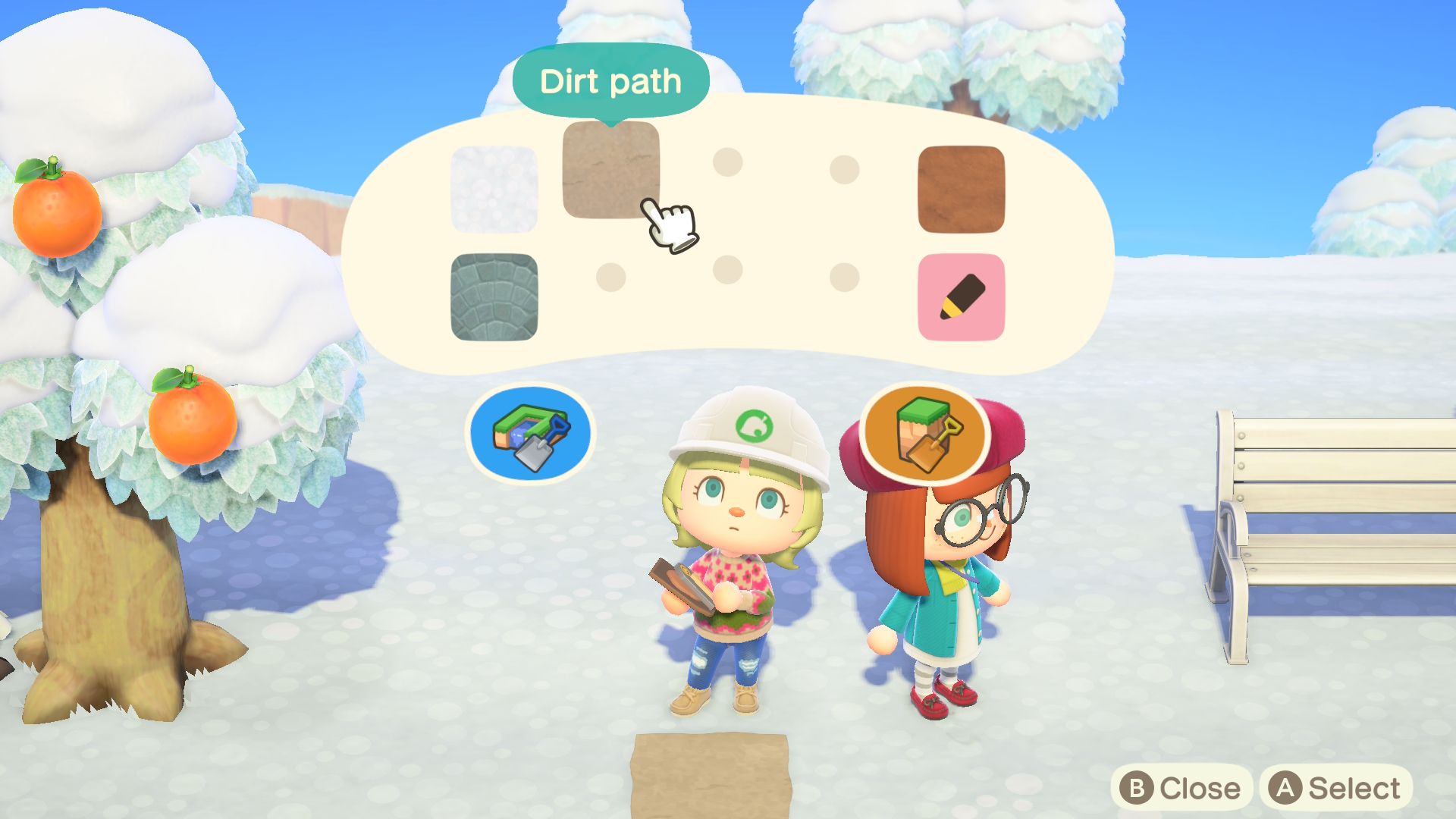
Custom designs work differently from regular items. The custom designs for each individual Slumber Island are shared across all players. You start with the default designs, and every player can import their own custom designs in. Anyone can then use these imported designs on the island (though you can only make edits to your own imported design).
If your bed uses a custom design, it will be visible to everyone else on the island even if you don’t import that design.
The drawback is that any designs created or adapted on the island will stay on the island forever. You can’t bring a custom design from a Slumber Island into your home island (much in the same way, I suppose, that you wouldn’t be able to recreate a design from an actual dream). If you delete the Slumber Island to make room for a new one in Animal Crossing: New Horizons, all its custom designs will be lost along with the island.

- Released
-
March 20, 2020
- ESRB
-
Everyone / Comic Mischief, Mild Fantasy Violence, Users Interact, In-Game Purchases
- Developer(s)
-
Nintendo EPD
- Publisher(s)
-
Nintendo
- Engine
-
Havok
- Multiplayer
-
Online Multiplayer, Local Multiplayer
- Cross-Platform Play
-
no
- Cross Save
-
no
- Expansions
-
Animal Crossing: New Horizons — Happy Home Paradise